What “They” Never Tell You About Owning a Business #MWLUG2015

Just over six years ago, my lovely and talented wife, Melissa Henderson left behind her employers and struck out on her own. Well, not alone. She brought along Joy Ruffin, who’d moved with her from Russell Reynolds to Gilbert Tweed. Oh, and she brought me, though I kept my day job. While our friend Joy isn’t with the company any more, it has grown far beyond using a spare bedroom as corporate headquarters. There have been a lot of lessons along the way, so when Lisa Duke’s session for MWLUG 2015 was announced, I put Melissa in touch with her. Melissa often travels with me to my conferences (and I sometimes to hers, since both of us can work from anywhere), so it seemed a perfect fit. Now, my wife will be on a panel at a technical conference before I’ve done it myself!

CS101: Entrepreneur’s Roundtable: What “They” Never Tell You About Owning a Business
Have you ever considered going out on your own as a consultant (or worry that one day your company may “liberate” you and you may need to contract between permanent jobs)? What are the common pitfalls to avoid? What’s involved? And with all that, what perks are there to make it worthwhile? Join the discussion from seasoned small business owners both inside and outside the IT world to share your experiences and learn from others.

I’m very much looking forward to the session, not just to see her speak (and videotape it, as I do several sessions at each MWLUG), but to hear the experience of the other entrepreneurs. As the spouse and sounding board for her, it will really help me her her in the future.

So, if you enjoy the session, make sure to introduce yourself and feel free to buy her a glass of French wine!

Categories: Conferences | Tags: , , , , , , | Leave a comment

Using the namePicker from the Extension Library in #XPages

One of the things that always seemed weak to me about my Domino web implementations was the selection and display of names. Now that XPages turns our work into the creation of actual web pages, the tools available are so much better and extend the flexibility of Notes development into the 21st century.

OK, saying “21st century” doesn’t sound as cool now that we’re halfway through the second decade, but since so much of what I’d done looked like it was designed in 1995, getting out of 20th century web development is a big step for me!

There are two control types from the Extension Library that are relevant here: the Dojo Name Text Box and the Name Picker.

The Dojo Name Text Box gives us that modern, Facebook-style name display, including a little “x” to delete the name from the list:

SelectTechnicalApprover

The Name Picker is very flexible. In my code example, I wanted users to be able to select from a view in the database, from the corporate NAB or, if they’re using XPiNC, from their personal address book. One of the nice thing about the picker is that if you supply multiple dataProviders, it provides a picklist of those choices, but if you only supply one (or if only one is ‘loaded’) then it doesn’t display the picklist of address books, allowing the user to just use the one NAB you’ve set as a dataProvider. It’s nice when you don’t have to tell the control the obvious things.

When you are setting up the namePicker, you need to select your dataProvider(s). There are three types (beanNamePicker, dominoNABNamePicker and dominoViewNamePicker) and the aggregator for using multiple providers (namePickerAggregator). As you can see in the example, if you choose the aggregator, you then identify your dataProviders inside that aggregator.

The dominoNABNamePicker is likely the one that’s most used, so also has a few pre-set configuration choices. While there are six parameters you could use, you can choose just to use two: addressBookSel and nameList.

  • For addressBookSel, you’re choosing between broad options: all, all-public, all-private, first, first-public, or db-name. Because our environment includes an address book for non-staff folks, I didn’t choose either all or all-public, which would have included that address book. So, I went with db-name, which allows you to specify the database name. The broader categories will work for you if you don’t have the requirement to leave out one of the address books.
  • For nameList, you also get some choices that are functional and make things easy for you: people, peopleByLastName, groups, or peopleAndGroups. This overrides two of the other parameters – groups and people, who are both boolean values. Using people as the nameList value returns people by first name, which can be a little annoying if you have thousands of choices, so it’s nice that peopleByLastName has beeen added.
  • The addressBookDb parameter only matters if you’ve selected db-name as the addressBookSel value. In my case, when the user is accessing our database in XPiNC on the local replica, their personal address book is names.nsf and the corporate one is minnames.nsf, so I’m doing a little trickery to give them all the options. I suppose I could have specified the corporate NAB and then used all-private to get to the personal address book, but I didn’t think of that first.
  • The loaded parameter is the most powerful one here for me, since it would allow me to provide the user more or fewer choices based on a formula. In this instance, the choice is only based on which client they’re using, but I could imagine basing it on roles, on values on the document or any variety of other things.
  • As mentioned above, the boolean values for groups and people are overridden by the value of nameList, so I’d avoid using them. Confusion is the likely result.

I was especially happy that using a view within the existing database in the namePicker was so simple. All I had to do was create a view that had the values I wanted in the first column, sorted ascending (I assume descending works as well, but that would be user-unfriendly). The dominoViewNamePicker is simple – really you only need to specify the databaseName and viewName. My samples view was in the same database, but you can point it elsewhere. There is a loaded parameter for your use and you can choose a label for the pick list when using multiple dataProviders.

							<xe:djextNameTextBox id="approversNameTextBox" value="#{deliverableDoc.Approvers}">
							</xe:djextNameTextBox>
							<xe:namePicker id="approversNamePicker" for="approversNameTextBox" listHeight="300px" listWidth="150px"
								pickerText="Click to select technical approver" rendered="#{javascript:deliverableDoc.isEditable();}">
								<xe:this.dataProvider>
									<xe:namePickerAggregator>
										<xe:this.dataProviders>
											<xe:dominoViewNamePicker label="Contacts" viewName="ContactsNotesName">
												<xe:this.databaseName><![CDATA[#{javascript:getDb("sharedResourcesDb",true);}]]></xe:this.databaseName>
											</xe:dominoViewNamePicker>
											<xe:dominoNABNamePicker nameList="people" addressBookSel="db-name" addressBookDb="names.nsf">
											</xe:dominoNABNamePicker>
											<xe:dominoNABNamePicker nameList="people" addressBookSel="db-name" addressBookDb="minnames.nsf">
												<xe:this.loaded><![CDATA[${javascript:@ClientType() == "Notes";}]]></xe:this.loaded>
											</xe:dominoNABNamePicker>
										</xe:this.dataProviders>
									</xe:namePickerAggregator>
								</xe:this.dataProvider>
							</xe:namePicker>

Unfortunately, I know very little about beans, so I’ll leave discussion of that to someone else, or to a future post if I can follow Russ Maher’s example and get into using Beans wherever they’re useful. The more tools you have in the box, the quicker and more flexibly you can get your work done.

Categories: Extension Library, Utilities, Xpages | Tags: , , , , , , | 2 Comments

Quick look at dialogContent and dialogButtonBar in #XPages

One of the challenges of XPages is figuring out what controls actually do. In a prior post, I wrote about using a dialog to return values to the XPage. It never occurred to me to use dialogContent and dialogButtonBar in the dialog. Today, when I was creating another dialog, I used the palette to find the dialog control and noticed those two. I wondered what they did, since, in my example, I hadn’t used them and my dialog displayed easily.

I checked the documentation, which really doesn’t help, stating simply that the dialogButtonBar “Contains buttons in a dialog.” That sure doesn’t tell me why I should use it instead of just putting my controls right into the dialog.

So, I did a little test.

<?xml version="1.0" encoding="UTF-8"?>
<xp:view xmlns:xp="http://www.ibm.com/xsp/core" xmlns:xe="http://www.ibm.com/xsp/coreex">
	<xp:link escape="true" text="Add a Linkage" id="addLinkageLink">
		<xp:image url="/plus.png" id="addLinkageImage" style="position:relative;left:2px;top:-2px;margin-right:5px;">
		</xp:image>
		<xp:eventHandler event="onclick" submit="false">
			<xp:this.script><![CDATA[XSP.openDialog('#{id:linkageDialog}');]]></xp:this.script>
		</xp:eventHandler>
	</xp:link>
	<xp:link escape="true" text="Add without content control" id="link1">
		<xp:image url="/plus.png" id="image1" style="position:relative;left:2px;top:-2px;margin-right:5px;">
		</xp:image>
		<xp:eventHandler event="onclick" submit="false">
			<xp:this.script><![CDATA[XSP.openDialog('#{id:contentFreeDialog}');]]></xp:this.script>
		</xp:eventHandler>
	</xp:link>
	<xp:br></xp:br>
	<xe:dialog id="linkageDialog" title="Add linkage">
		<xe:dialogContent id="dialogContent1">
			<xp:label value="Label" id="label1"></xp:label>
			<xp:inputText id="inputText1"></xp:inputText>
		</xe:dialogContent>
		<xe:dialogButtonBar id="dialogButtonBar1">
			<xp:button value="OK" id="button1"></xp:button>
			<xp:button value="Cancel" id="button3">
				<xp:eventHandler event="onclick" submit="false">
					<xp:this.script><![CDATA[XSP.closeDialog('#{id:linkageDialog}');]]></xp:this.script>
				</xp:eventHandler>
			</xp:button>
		</xe:dialogButtonBar>
	</xe:dialog>
	<xe:dialog id="contentFreeDialog">
		<xp:label value="Label" id="label2"></xp:label>
		<xp:inputText id="inputText2"></xp:inputText>
		<xp:button value="OK" id="button2"></xp:button>
		<xp:button value="Cancel" id="button4">
			<xp:eventHandler event="onclick" submit="false">
				<xp:this.script><![CDATA[XSP.closeDialog('#{id:contentFreeDialog}');]]></xp:this.script>
			</xp:eventHandler>
		</xp:button>
	</xe:dialog>
</xp:view>

The dialog using the dialogContent and dialogButtonBar controls looks far nicer. I did put the title on the one without those sub-controls in order to make the disparity even more stark. When using the sub-controls, the placement of the content and the buttons is handled for you, without requiring the additional formatting I had to do in the prior post using a dialog. So, here’s the ugly one, which doesn’t use the sub-controls and will require some formatting:

DialogWithoutSubControls

And here’s the pretty one, with the sub-controls in use:

DialogUsingSubControls

So, using the dialogContent and dialogButtonBar controls makes your life easier and your users happier.

Categories: Extension Library, Xpages | Tags: , , , , | Leave a comment

Creating a meeting in the UI in #IBMNotes

When we tout the advantages of using Notes, one of the key points we always mention is the tight integration between Notes applications and Notes mail. Part of this ought to be tight integration with calendaring and scheduling. Oddly, I’ve never written an application that has any interface with the user’s calendar. This had to change. Our users wanted to be able to create a meeting notice from the Quarterly Project Review (QPR) document for that review, taking up the dates and participants from that document seamlessly into the notice. I scratched my head because I’d never even tried it, though I was sure it had to be easy.

So, I looked at what form was used by the meetings I attend. I must have clicked on a proposed meeting because I chose ‘Notice’. I just added a button on the QPR form to create and send Notice documents to the chair and each of the attendees. That looked like it worked because it would show up in people’s inboxes and they could click to accept or decline. Of course, it would disappear once that happened. Oops.

Not only that, but since many of the legacy Notes apps here use formula language to create messages in the UI for users to complete when requesting approvals, my users told me they really wanted to be able to edit the notice. I groused because I find that process inefficient. Users can choose to never send the email or change it in ways that are unexpected. I like approval requests to go silently or to allow the user to enter some additional text, but not to give them full control.

Fortunately, I figured out that I ought to using the Appointment form.

Determining the solution

As I learned more about their requirements, I realized that with all the things they wanted to be able to change, I should give in and simply open in the UI. The fact that any form in the mail template is endlessly complicated was a big incentive as well.

So, I searched the internet to see if anyone else had done this and only came up with a formula language method, which mostly worked, but not quite. Then, taking the formula language code as my example, I built a LotusScript agent that does a nice job of it.

I thought that I could first create the document as a NotesDocument object and then open it using the editDocument method of the NotesUIWorkspace object. I’m not sure if it was because I didn’t set the right fields or not enough fields, but it simply didn’t work when I tried it that way. So, I went the full monty and simply opened it as a NotesUIDocument right from the start.

Interestingly, when all I did was insert names into the required (EnterSendTo) and optional (EnterCopyTo) fields, we realized that you didn’t get to see their schedules to find the right time for the meeting. One of the testers found that clicking on the highlighted ‘Required’ would make them appear. So, checking that link reveals some curious formula language coding:

FIELD EnterSendTo:= @Trim(EnterSendTo);
FIELD EnterCopyTo:= @Trim(EnterCopyTo);
FIELD EnterBlindCopyTo:= @Trim(EnterBlindCopyTo);
@Command([MailAddress];"EnterSendTo";"EnterCopyTo";"EnterBlindCopyTo");
@Command([EditGotoField]; "EnterSendTo");
@Command([EditInsertText]; " ");
@Command([EditGotoField]; "EnterCopyTo");
@Command([EditInsertText]; " ");
@If(EnterBlindCopyTo!="" & @GetProfileField("CalendarProfile"; "showCalBCC") = "1";@Command([EditGotoField]; "EnterBlindCopyTo");"");
@If(EnterBlindCopyTo!="" & @GetProfileField("CalendarProfile"; "showCalBCC") = "1";@Command([EditInsertText]; " ");"");
@PostedCommand([ViewRefreshFields])

So, it’s quirky. Using @Trim, I can understand, but why would it insert the blank space into the two fields? Then I noticed an event on each field.

Sub Onchange(Source As Field)
	Call csEventObj.onChange(FIELD_INVITEES_CHANGED, ITEM_REQUIRED )
	Call csEventObj.UpdateScheduler( ITEM_REQUIRED, ROLE_REQUIRED, APPFLAG_NEW )
	
	If Not (cseventobj.m_note.IsNewNote) Then
		cseventobj.NeedsOLPTran = True
	End If
End Sub

So, the link runs formula language that kicks off the onChange event, which does additional processing. So, when coding one’s agent to create the appointment in the UI, just repeat what the formula language does, only in script. Thus, lines 90-94 in my agent make sense.

The final quirk is with my original QPR document. If the user was in read mode, the agent ran beautifully, but if they were in edit mode, I needed to make sure I had the values on the back end AND that the code didn’t ‘get confused’ with which uidoc was which. Perhaps it was something convoluted with my code, but I found it best if I put the QPR document back into read mode. Then, to avoid issues with how I’m recording the ‘history’ (noting on the QPR that someone created a meeting notice), I decided to close and reopen it in read only mode. Allowing it to be edited was creating confusion, since it threw odd prompts and might generate rep-save conflicts. As such, I’m doing an odd dance with values and objects on lines 50-55.

The agent

%REM
	Agent Send Calendar Invites
	Created Dec 23, 2014 by David Navarre/DAI
	Description: This Agent creates a calendar invite, listing participants and optional participants
%END REM
Option Public
Option Declare
Use "Utilities"
Sub Initialize
	Dim session As New NotesSession
	Dim ws As New NotesUIWorkspace
	Dim thisdb As NotesDatabase
	Dim maildb As New NotesDatabase ( "", "" )
	Dim uidoc As NotesUIDocument
	Dim memoUIdoc As NotesUIDocument
	Dim qprDoc As NotesDocument
	Dim history As NotesRichTextItem
	Dim recipientName As NotesName
	Dim qprDate As Variant
	Dim qprTime As Variant
	Dim projectName As Variant
	Dim fiscalYearAndQuarter As Variant
	Dim participants As Variant
	Dim participantsOptional As Variant
	Dim timeString, dateString As Variant
	Dim answer As Variant
	Dim reason As String
	Dim unid As String

	On Error GoTo errorhandler
	
	Call StartAgentLogging ( session )

	Set thisdb = session.Currentdatabase

	Set uidoc = ws.Currentdocument

	reason = "This will create a meeting invite for you to send to participants."
	If uidoc.Editmode Then
		reason = reason + Chr$(10) + "The QPR will switch to read-only mode."
		reason = reason + Chr$(10) + "If you close and re-open it, you can edit it again."
	End If
	reason = reason + Chr$(10) + "Continue?"
	answer = ws.Prompt ( PROMPT_YESNO, "Continue?", reason )
	If answer = 0 Then
		Exit Sub
	End If	
		
	If uidoc.Editmode Then
		Call uidoc.Save()
		uidoc.Editmode = False
		Set qprDoc = uidoc.Document
		unid = qprDoc.Universalid
		Call uidoc.Close(True)
		Set qprDoc = thisdb.Getdocumentbyunid(unid)
		Set uidoc = ws.Editdocument(False, qprDoc, True)
	Else
		Set qprDoc = uidoc.Document
	End If
	
	Set qprDate = qprDoc.Getfirstitem("QPRDate")
	Set qprTime = qprDoc.Getfirstitem("QPRTime")
	timeString = qprTime.Text
	dateString = qprDate.Text
	Dim qprStartTime As New NotesDateTime ( timeString )

	Call maildb.Openmail()
	Set memoUIdoc = ws.Composedocument(maildb.Server, maildb.Filepath, "Appointment")
	projectName = qprDoc.Getitemvalue("ProjectName") 
	fiscalYearAndQuarter = qprDoc.Getitemvalue("FiscalYearAndQuarter") 
	Call memoUIdoc.Fieldsettext("Subject", fiscalYearAndQuarter(0) & " QPR: " & projectName (0) )

	Call memoUIdoc.Fieldsettext("STARTDATE", dateString )
	Call memoUIdoc.Fieldsettext("STARTTIME", timeString )
	Call memoUIdoc.Fieldsettext("ENDDATE", dateString )
	Call qprStartTime.Adjusthour(1, False)
	Call memoUIdoc.Fieldsettext("ENDTIME", qprStartTime.Timeonly)

	participants = qprDoc.Getitemvalue ( "Participants" )
	ForAll entry In participants
		Set recipientName = New NotesName ( entry )
		Call memoUIdoc.Fieldappendtext("EnterSendTo", recipientName.Abbreviated & Chr$(10) ) 
	End ForAll
	participantsOptional = qprDoc.Getitemvalue ( "ParticipantsOptional" )
	ForAll entry In participantsOptional
		Set recipientName = New NotesName ( entry )
		Call memoUIdoc.Fieldappendtext("EnterCopyTo", recipientName.Abbreviated & Chr$(10) ) 
	End ForAll

	Call memoUIdoc.Gotofield("EnterSendTo")
	Call memoUIdoc.Inserttext(" ")
	Call memoUIdoc.Gotofield("EnterCopyTo")
	Call memoUIdoc.Inserttext(" ")
	Call memoUIdoc.Gotonextfield()
		
	Set history = qprDoc.Getfirstitem("History")
	Call history.Appendtext(Now & " - Meeting notice created by " & session.Commonusername)
	Call history.Addnewline(1, True)
	Call qprDoc.Replaceitemvalue("NoticeFlag", 1)
	Call qprDoc.Save(True, False)
	
exiting:
	Exit Sub
errorhandler:' report all errors in a messagebox
	reason = "Error #" & CStr (Err) & " (" & Error & ") on line " & CStr (Erl)
	MessageBox reason, 16, "Error"
	Call agentLog.LogAction ( reason )
	Resume exiting ' transfers control to the exiting label
End Sub

Final thoughts

I’m sure I can do this a bit more efficiently, but I’m pretty happy with this first foray into calendaring & scheduling. We’ll probably refine this a little and do more of it in our projects. Users always want to be able to skip re-typing everything and there’s no reason not to handle it for them. Of course, we’re likely to have to revise all of this once we move to Verse, but, as my father always said, “I’ll burn that bridge when I come to it.”

Categories: Old Notes | Tags: , , , | 3 Comments

Mastering #XPages: Buy the eBook

I’ve had my copy of Mastering XPages (2nd Edition) for a little while. It’s a darn heavy book, but because of that, it’s packed with information. More packed that the 1st Edition? Why, yes, yes it is. Mine is in hard cover and the 1100-plus pages is a little bit daunting to carry around. Nonetheless, there is nothing quite like it.

I’ve always been a guy who learns well from physical books. I like the feel of them. I like the structured approach to learning that they provide. The code examples in the text, along with great images, really provide a lot on insight to what you can do with XPages. I’d say it compares well with reading a variety of blogs because of the depth and structure provided. I can and do read dozens of blogs, but they don’t have any comprehensive structure. For example, I write mostly about the problems that I’ve encountered coding in XPages. While that might teach you a lot about XPages, it’s got no structure at all. If you read Marky’s blog, you’ll learn a lot, and often in a structured manner about the topic he’s dealing with, but it won’t take you from ground zero to XPages developer. Similarly, the extensive XPages library over at Notes in 9 is fantastic (and you ought to be watching all of those videos), but there’s not necessarily a comprehensive plan, nor a logical learning order. I love Paul Della-Nebbia’s video series, Intro to XPages, as it’s a great place to start learning, but you won’t get 21 chapters of knowledge there.

Now, before you start thinking it’s a massive slog of text with only hard-copy code samples, brace yourself. Just like the blogs noted above, you can download sample applications that go along with the examples in the book to help you learn all aspects of XPages.

In the months I’ve owned it, I’ve read several chapters straight through, used one chapter (18 – Internationalization) to add a huge capability to our applications with a mere hour of research and searched through the massive text for little bits and pieces.

This brings me to the electronic version. I’m old. I’ve admitted above to loving books. As I was pondering my review, I thought I needed to try the electronic version. So, using the code supplied in the hard-copy of the book, I added the electronic version to my tablet (Motorola Xoom that’s getting a bit long-in-the-tooth). I searched a little, which definitely beats the heck out of the hard copy’s index, since you can not only find more, but also jump directly to that spot in the text. I sat and read a little — I’ve already established that I’m willing to read books on it with military history — and it’s very nice. When you get into books over a thousand pages, it’s so much easier to tote around an electronic copy in your backpack, or read on the Metro, or pluck it out of your carry-on while flying to MWLUG. I highly recommend the electronic version. Depending on finances, I might not worry about the hard copy next time and simply get my hands on the e-book.

This edition adds in various changes from the release of the 1st edition — over 3 years of changes. It’s written in the irrepressible style that won Marky’s approval. It’s a jam-packed learning experience. If you don’t have it already, do yourself a favor and get a copy today. Try the electronic version. You’ll thank me.

Categories: Xpages | Tags: , , , , , , | 3 Comments

Configurable notification agent in #OldNotes

Shockingly, when I arrived at my current company, they had basically NO scheduled agents at all. Apparently, someone had decided long ago that scheduled agents were dangerous, that they would overwhelm and crash the servers. So, whenever anything was done, it was done manually. This even extended to user notifications. That is, if I submitted a document for approval, there was some formula language that would populate a new notification message in the client and the user would fill in any extra details before clicking send. I was shocked. As I’ve modified designs, I’ve been adding background notifications and also scheduled agents. Our main project management database, which our field offices use copies of to manage their projects, hasn’t been mine to modify, since it’s already working and there is a team that customizes the design for each field office.

As we’ve been delving further into XPages and as I’ve been spreading the good word about scheduled agents and notifications, we’re now finally putting them into those project management databases. One hurdle though. Our admin team has, quite rightly, limited who can sign agents that will run on production servers.

Concept

Now, I’ve designed dozens or even hundreds of notification and reminder agents in many databases over the decades, but I always designed them from scratch, customizing it to the particular database and the particular recipients. I’d created a basic one and Ariwan Susey, who’s really coming up to speed on LotusScript and XPages, modified it for use in that project management database. This was nice, and Virginia Tauss had started creating copies of it, customized for each notice type. However, every time someone made a change to the half-dozen agents, I had to sign them. Since they were customized for their particular database and the particular recipients, this meant that eventually, I might spend all day signing agents instead of writing code.

Since the agents were almost the same, except for what view they used and who received the message, I realized that if I created a basic agent, they could use configuration documents to customize as many notices as they wanted and I’d never have to sign that configurable agent again!

Configuration Choices

There were a few basic things I knew would be different between each notification: the view, the recipients, the subject, the server to run on and the time to run. After creating some tests, I also realized that I wanted to emulate the scheduling choices of agents themselves and allow the user to select weekly or monthly notifications instead of just daily. I also remembered that sometimes, they would want to mark the document after they sent the notice, so I made that a configuration choice as well. Based on my recent experience in my Excel series (part 1, part 2, and the sample database) and with full-text queries, I realized we could use those full-text queries in these notifications as well.

So, here’s my form:
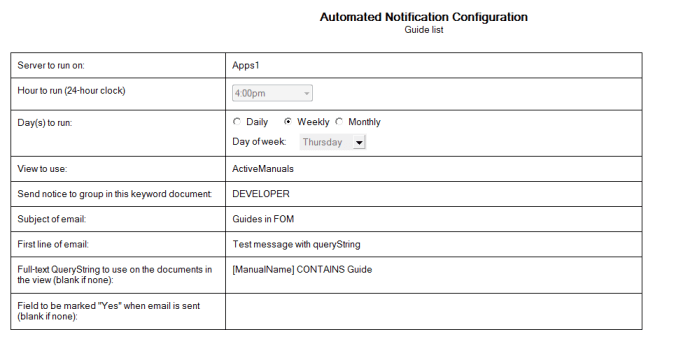
AutoNotify Configuration

Since I’ve been fiddling with DXL editing of forms lately, let me include the DXL for that third row for your review. The right cell contains a table for displaying the weekday or day of the month choices, with the hide-whens appropriately.

<tablerow>
	<tablecell><par def='4'>Day(s) to run:</par></tablecell>
	<tablecell>
		<par def='5'>
			<field borderstyle='none' lookupeachchar='false' lookupaddressonrefresh='false'
			type='keyword' kind='editable' name='frequency'>
				<keywords helperbutton='false' recalconchange='true' columns='3' ui='radiobutton'>
					<textlist><text>Daily</text><text>Weekly</text><text>Monthly</text></textlist>
				</keywords>
			</field>
		</par>
		<table leftmargin='0' widthtype='fixedleft' refwidth='2.5000in'>
			<tablecolumn width='1in'/><tablecolumn width='1.5000in'/>
			<tablerow>
				<tablecell valign='center' borderwidth='0px'>
					<pardef id='6' spacebefore='1.5' keepwithnext='true' keeptogether='true'>
						<code event='hidewhen'><formula>frequency != "Weekly"</formula></code>
					</pardef>
					<par def='6'>Day of week: </par>
				</tablecell>
				<tablecell valign='center' borderwidth='0px'>
					<pardef id='7' spacebefore='1.5' keepwithnext='true' keeptogether='true'>
						<code event='hidewhen'><formula>frequency != "Weekly"</formula></code>
					</pardef>
					<par def='7'>
						<field usenotesstyle='false' height='0.2500in' width='1in' multiline='true'
						borderstyle='none' lookupeachchar='false' lookupaddressonrefresh='false'
						type='keyword' kind='editable' name='weekdayToRun'>
							<keywords helperbutton='false' columns='1' ui='combobox'>
								<textlist>
									<text>Sunday|1</text>
									<text>Monday|2</text>
									<text>Tuesday|3</text>
									<text>Wednesday|4</text>
									<text>Thursday|5</text>
									<text>Friday|6</text>
									<text>Saturday|7</text>
								</textlist>
							</keywords>
						</field>
					</par>
				</tablecell>
			</tablerow>
			<tablerow>
				<tablecell valign='center' borderwidth='0px'>
					<pardef id='8' keepwithnext='true' keeptogether='true'>
						<code event='hidewhen'><formula>frequency != "Monthly"</formula></code>
					</pardef>
					<par def='8'>Day of month:</par>
				</tablecell>
				<tablecell valign='center' borderwidth='0px'>
					<pardef id='9' keepwithnext='true' keeptogether='true'>
						<code event='hidewhen'><formula>frequency != "Monthly"</formula></code>
					</pardef>
					<par def='9'>
						<field type='number' kind='editable' name='monthdayToRun'>
							<numberformat format='general' digits='2' punctuated='false' parens='false' percent='false'
							bytes='false'/>
							<code event='defaultvalue'><formula>1</formula></code>
							<code event='inputvalidation'><formula>@If ( frequency != "Monthly"; @Success; @ThisValue > 1 
								& @ThisValue < 29; @Success; @Failure ( "Must be in the first 28 days of the month"))</formula>
							</code>
						</field>
					</par>
				</tablecell>
			</tablerow>
		</table>
		<pardef id='10' keepwithnext='true' keeptogether='true'>
			<code event='hidewhen'><formula>frequency != "Monthly"</formula></code>
		</pardef>
		<par def='10'><run><font size='1pt'/></run></par>
	</tablecell>
</tablerow>

As I use the source view more in XPages, I get more and more comfortable with just editing code, and checking appearances occasionally. While I have only done a little of that in forms, I have used it several times in views. When I created this form, my initial design of it was done by creating a single in the normal designer form, then saving it, and re-opening it in DXL. Then I added several fields to a form with cut-and-paste for field names. Using the properties boxes just seemed like it would take so much longer – after all, I had the field names in my notepad already.

The Agent

Our agent is set to run hourly, on every server. If there are no autoNotify documents, it doesn’t do anything, but if there are, it checks each one for whether it runs on that server, on that day and at that hour.

Sub Initialize
Dim session As New NotesSession
' thisdb is declared in my utilities library, so not declared here '
Dim autoNotifyView As NotesView
Dim autoNotifyDoc As NotesDocument
Dim serverToRunOn As Variant
Dim hourToRun As Variant
Dim frequency As Variant
Dim weekdayToRun As Variant
Dim monthdayToRun As Variant
Dim noticeName As Variant
Dim hourNow As Integer
Dim weekdayToday As Integer
Dim monthdayToday As Integer
Dim reason As String

On Error GoTo errorhandler

Set thisdb = session.Currentdatabase
Call StartAgentLogging ( session )

Dim serverName As New NotesName ( thisdb.Server )

' get view of autonotify documents '
Set autoNotifyView = thisdb.Getview("AutoNotify")
Set autoNotifyDoc = autoNotifyView.Getfirstdocument()

While Not autoNotifyDoc Is Nothing
	' check server to run on '
	serverToRunOn = autoNotifyDoc.Getitemvalue("serverToRunOn")
	If ( Ucase ( serverToRunOn (0) ) = Ucase ( serverName.Common ) ) Then
		' check frequency and day '
		frequency = autoNotifyDoc.Getitemvalue("frequency")
		weekdayToRun = autoNotifyDoc.Getitemvalue("weekdayToRun")
		If ( weekdayToRun (0) = "" ) Then
			weekdayToRun (0) = "0"
		End If
		weekdayToday = Weekday ( Today )
		monthdayToRun = autoNotifyDoc.Getitemvalue("monthdayToRun")
		monthdayToday = Day ( Today )
		If ( frequency (0) = "Daily" or ( frequency (0) = "Weekly" And CInt (weekdayToRun (0)) = weekdayToday ) Or ( frequency (0) = "Weekly" And CInt ( monthdayToRun (0) ) = monthdayToday ) ) Then
			' check hour to run '
			hourToRun = autoNotifyDoc.Getitemvalue("schedule")
			hourNow = Hour (Now)
			If ( CInt ( hourToRun (0) ) = hourNow ) Then
				noticeName = autoNotifyDoc.Getitemvalue("NoticeName")
				If ( sendNotices ( autoNotifyDoc ) ) Then
					Call agentLog.LogAction ( noticeName (0) & " sent")
				Else
					Call agentLog.LogAction ( noticeName (0) & " FAILED")
				End If
			End If
		End If
	End If

	Set autoNotifyDoc = autoNotifyView.Getnextdocument(autoNotifyDoc)
Wend
Call agentLog.LogAction ( "Completed" )

exiting:
	Exit Sub
errorhandler:' report all errors in a messagebox '
	reason = "Error #" & CStr (Err) & " (" & Error & ") on line " & CStr (Erl)
	MessageBox reason, 16, "Error"
	Call agentLog.LogAction ( reason )
	Resume exiting ' transfers control to the exiting label

End Sub

The actual notification builds off the values from the configuration document. At MWLUG, speakers recommended making sure to use functions instead of subroutines, partly because functions return a value and partly for forward compatible with other programming languages. So, my sendNotices function is a boolean, indicating success or failure.

The simplest, yet most powerful part of the script is the application of the querystring. By using that, I could create dozens of notifications from a single view, saving myself disk space by avoiding unnecessary view indices.

Ariwan’s great contribution to the basic agent that made it so useful in this configurable design was the use of columnvalues. The agent simply spits out the contents of the view, populating the message with the details of the document regardless of which fields are used. I’d never thought of doing that!

You’ll notice that in the loop, we get a handle to the nextdoc before processing. If the document would be removed from the view by marking one of the fields “Yes” and saving the document, we need to already have a handle to the next document. If we don’t do that, the view won’t be able to find the next document by referring to the current document, as it has no position in the view any more.

Now, since I want each notification to be processed even if I encounter some errors, I added error-handling in the function as well. If I had not, an error would bubble up to the Initialize routine and stop my agent. This way, it only stops that particular notification, but continues to the next one.

Function sendNotices ( autoNotifyDoc As NotesDocument ) As Boolean
Dim viewName As Variant
Dim recipientGroup As Variant
Dim subjectLine As Variant
Dim introText As Variant
Dim queryString As Variant
Dim flagField As Variant

Dim workingView As NotesView
Dim workingCollection As NotesDocumentCollection
Dim doc As NotesDocument
Dim nextdoc As NotesDocument
Dim memo As NotesDocument
Dim body As NotesRichTextItem
Dim reason As String
Dim count As Integer

sendNotices = false

' get viewName '
viewName = autoNotifyDoc.Getitemvalue( "viewName" )
Set workingView = thisdb.Getview ( viewName (0) )
' apply query string, if there is one '
queryString = autoNotifyDoc.Getitemvalue( "queryString" )
If ( queryString (0)<> "" ) Then
	Call workingView.Ftsearch(queryString(0), 0)
End If

Set doc = workingView.Getfirstdocument()

count = 0

Set memo = thisdb.Createdocument()
Set body = memo.Createrichtextitem(&quot;Body&quot;)
memo.Principal = thisdb.Title

' copy the introductory text from the autoNotify document into the email '
introText = autoNotifyDoc.Getitemvalue( "introText" )
Call body.Appendtext ( introText(0) )
Call body.Addnewline(2)

While Not doc Is Nothing
	Set nextdoc = workingView.Getnextdocument(doc)
	count = count + 1
	Call body.Appendtext( CStr ( count ) & "." )
	Call body.Addtab(1)
	ForAll thing In doc.Columnvalues
		If ( IsArray ( thing ) ) Then
			Call body.Appendtext( Implode (thing, ", " ) )
		Else
			Call body.Appendtext( thing )    
		End If
		Call body.Addtab(1)
	End ForAll
	Call body.Appenddoclink(doc, "Open the doc", "Link")
	Call body.Addnewline(1)

	' if field to mark, then modify field and save doc '
	flagField = autoNotifyDoc.Getitemvalue( "flagField" )
	If ( Trim ( flagField (0) ) <> "" ) Then
		Call agentLog.LogAction ( flagField (0) & " field #" & CStr ( count ) )
		Call doc.ReplaceItemValue ( flagField (0), "Yes" )
		Call doc.Save ( True, False )
	End If

	Set doc = nextdoc

Wend

subjectLine = autoNotifyDoc.Getitemvalue( "subjectLine" )
memo.Subject = CStr (count) & " " & subjectLine (0)
recipientGroup = autoNotifyDoc.Getitemvalue("recipientGroup" )
Call memo.Send(False, DetermineKeyword ( recipientGroup(0)) )

sendNotices = True

exiting:
	Exit Function
errorhandler:' report all errors in a messagebox '
	reason = "Error #" & CStr (Err) & " (" & Error & ") on line " & CStr (Erl)
	MessageBox reason, 16, "Error"
	Call agentLog.LogAction ( reason )
	Resume exiting ' transfers control to the exiting label '

End Function

It’s not quite perfect because if the server is down, it won’t run the notification later. I might take that into account in a future version, since many our project servers are in locations where power may not always be 24×7. Similarly, if someone puts too many notifications to run at the same time, the agent could time out, failing to run all of them.

Hopefully, this exercise proves useful to someone else. I can’t believe I spent more than a decade constantly re-writing the same code when I could have saved myself considerable time by just creating a customizable, reusable piece of code back in the day. Live and learn!

Update:
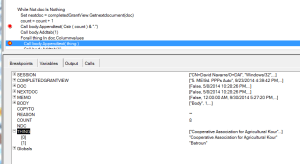
ThingFailsTurns out there was a bug in the code. The simple loop through the columnValues didn’t take into account multi-value fields. So, when the agent ran on a view with a document that had multiple values, it was trying to print a variant as text. So, I added a simple check for IsArray and imploded the multi-value field to build a comma-delimited string. That avoids the type mismatch that our script was throwing when it found those multi-value fields as shown at right in the debugger.

Categories: Old Notes, Utilities | Tags: , , , , | 1 Comment

MWLUG 2014 video series on Youtube

I took along my videocamera to MWLUG 2014 in Grand Rapids and I’ve created a playlist of the videos that I’ve already uploaded to Youtube. Since I’m a developer, it leans heavily on development sessions.

As more are added, they will appear there and here….

The playlist includes the following videos thus far:

AD104: Build A Bean Workshop – Devin Olson and Mike McGarel

BP107 Java versus Javascript: There really is no competition – Andrew Barickman

AD101: Achieving Developer Nirvana With Codename BlueMix – Ryan Baxter

AD105: Building a Structured App With XPages Scaffolding – Jesse Gallagher

Bonus track: WWII veteran Virgil Westdale in the Opening General Session

Other sessions are waiting on some approvals from the speakers and some editing (one session had live data displayed, so I have to edit that out)

These only give an impression of the event. You get an awful lot more out of it if you attend. So, see you in Atlanta next year!

Categories: Conferences, Java, Videos, Xpages | Tags: , , , , , , , | 2 Comments

Are you sure? Asking for confirmation in #XPages

Often, we want to confirm with the user that they actually want to save or submit a document in XPages. I thought it would be very simple to customize the server-side simple action ‘confirm’ to include client-side data that the user had just entered, but that was not yet saved to disk.

So, I had what I thought was some simple and straight-forward SSJS:

<xp:confirm>
    <xp:this.message><![CDATA[#{javascript:var baseText = "Are you sure that you want to set the exchange rate for ";
        var effectiveDate = getComponent("effectiveDate").getValue().toString();
        var localCurrency = getComponent("localCurrency").getValue();
        var exchangeRate = getComponent("exchangeRate").getValue();
        return baseText + localCurrency + " to " + exchangeRate + " as of " + effectiveDate + "?"; }]]>
    </xp:this.message>
</xp:confirm>

I posted my question on StackOverflow and Paul Withers pointed out that I wasn’t going to get what I was looking for….

You’re computing SSJS to pass to a CSJS confirm() message. I would expect it to display values at the last refresh, not values just entered by the user. If you want the latest values, I think you’ll need to access them via CSJS.

So, I made the classic mistake of failing to know whether I and my data were client-side or server-side. Thus, my getComponent commands were getting a handle to the last version of the server-side component, not what the user just entered on the client-side. So, I needed to move back to the client-side to display client-side values. Fortunately, I remembered that if your client-side javascript evaluates to false, the server-side script never executes.

<xp:eventHandler event="onclick" submit="true" refreshMode="complete"
        immediate="false" save="true" id="eventHandler3">
        <xp:this.script><![CDATA[var baseText = "Are you sure that you want to set the exchange rate for ";
            var effectiveDate = document.getElementById("#{id:effectiveDate}").value;
            var localCurrency = document.getElementById("#{id:localCurrency}").value;
            var exchangeRate = document.getElementById("#{id:exchangeRate}").value;
            return window.confirm (baseText + localCurrency + " to " + exchangeRate + " as of " + effectiveDate + "?");]]>
        </xp:this.script>
        <xp:this.action><![CDATA[#{javascript:exchangeRateDoc.save();
    context.redirectToPage("/pro_exchangeRate_view.xsp")}]]>
        </xp:this.action>
</xp:eventHandler>

The key to the client-side javascript is to make sure you return the value of that window.confirm at the end. In my initial attempt, I didn’t return the value and my testers pointed out to me that my ‘Are you sure?’ was just taunting my users. It would ask the question, but it ignored the response. Clicking OK would save it, as intended, but clicking Cancel would ALSO save it! Talk about ignoring user input!

Hopefully, my mistake will prove instructive in your attempts to find your way in XPages…..

Categories: Client-Side Javascript, Server-Side Javascript | Tags: , , , , | 2 Comments

Exception avoided in FTSearchSorted in #XPages

Regular readers will remember that I’ve been playing around with using FTSearchSorted in order to create Excel spreadsheets from Notes databases in XPages. I’d had that in my sample database for a while, but hadn’t used it our production environment yet. I worried that my experience with crashes was going to be repeated and that it would take forever to integrate it into the design. Fortunately, I got over my concern about crashes (that’s what an admin team is for, right?) since my coding and the versioning all make it seem stable. The integration of the changes (modify one form, one button on a custom control and a few lines in a script library) was relatively quick. So, in the spirit of the 442nd, I decided to “Go For Broke”.

Having pushed the changes to my development environment, I set up a new report with a querystring and a sort column. My brilliant code would soon return a report of all contacts with their city = “Bethesda”, sorted by… Position since that was a column in the view and I was being random. It didn’t work. I played around with the querystring and finally decided to use FTSearch without using sort or my sort column. That worked. So, I tried FTSearchSorted, with the column name in parentheses, so it would definitely be string. Then, a number for the column instead. Then, I decided, I wouldn’t provide a sort column at all. That worked. So it wasn’t the method and it wasn’t the values I was passing to it. It just returned a silly null object every time.

So, I turned to Stack Overflow. Sure enough, someone else had the problem. The answer provided (too short in the Stack Overflow admins’ minds) was from Thomas Adrian, “make sure the view is user sortable”. Aha! I went back to my form, on which I had placed useful help text that I didn’t bother to read:

A column may only be used for sorting if it has been designed to allow “Click on column header to sort” on the Sorting tab of the column properties. The relevant options are Ascending, Descending, and Both. Trying to sort a column in an unsupported direction throws an exception.

I even bolded the important part of the text on my form. I hadn’t read it when I picked my sort column, so it threw an exception every time I used one of those unsorted columns.

Since I’ve demonstrated that even I won’t read my help text, I’ve changed the code on the button that allows you to select which column to use as your sort column so that you can’t choose one that isn’t sorted either ascending or descending. It will only list choices that are click to sort one way or the other (or both).

Forall columns In columnArray
	If ( columns.Isresortascending Or columns.Isresortdescending ) Then
		' add each view name to an array if it is eligible for click to sort
		Redim Preserve headerArray ( count )
		headerArray ( count ) = columns.ItemName
		Print headerArray ( count )
		count = count + 1
	End If
End Forall

I’ve added a clearer explanation to Thomas’ answer, but that short sentence was all the answer I needed. Once my expansion of his answer clears the editors, it will look nicer up there, but since you’ve already read this blog post, you won’t need it, eh?

I’ve updated the sample database, so you can download it to see the rest of how it works if the code sample is not enough. I’ll be at MWLUG starting tomorrow afternoon, so make sure to say “Hello”!

Categories: Server-Side Javascript, Xpages | Tags: , , , , , , , | Leave a comment

Why our guest speaker matters at #MWLUG

As are many others, I’m preparing myself for next week’s MWLUG. However, since I’m not a speaker yet, much of my preparation involves being ready to ask good questions — and helping others do the same. In particular, I have a background in military history that matches very well with our guest speaker, Virgil Westdale.

As some of you know, I blog about military history, with emphasis on World War II. I’ve spoken at some conferences about the role of the 36th Infantry Division in the invasion of southern France (Operation Dragoon) and the fighting in the Vosges Mountains (preceding the Battle of the Colmar Pocket). Mr. Westdale served with the 442nd Regimental Combat Team in WWII and they were ‘attached’ to the 36th Infantry Division during that fighting in the Vosges Mountains.

What’s a Regiment and what’s a Division?

One of the challenges when talking about military history is the terminology. Most people have heard of Divisions and are likely familiar with a few (101st Airborne Division, known as the ‘Screaming Eagles’, or the 1st Infantry Division, known as ‘The Big Red One’). Divisions are large with around 15,000 men being a common size for American Divisions in WWII. A Division was usually comprised of 3 Regiments and assorted other units, some ‘organic’ and some ‘attached’. Organic elements are those units that are a normal part of the larger unit, while attached elements are those assigned on a temporary basis.

Among the units that would be organic or attached to a Division would be infantry, artillery, armored (tanks), engineers, medical units, and various logistical elements. Normally, units smaller than a Division didn’t get different types of units assigned to them. However, a Regimental Combat Team was different. Like a Division, the RCT could have those other units assigned to it. That way, the RCT could fight as a separate unit, with its own ‘organic’ anti-tank, artillery and engineering units. The Army didn’t have a lot of RCTs, since they preferred to do things on a Divisional scale.

The pain of attached units

Any time that a unit was attached temporarily to a larger unit, it tended to suffer worse than the organic units. That is, if I had three Regiments and got another temporarily, I would probably use that temporarily attached one more vigorously. As a Divisional commander, you’d know each of Regiments and likely be concerned about their welfare. The attached unit wouldn’t be one familiar to you, so you wouldn’t have the empathy for them — and if they were joining you while you were already fighting, they’d be ‘fresh’ and more able to cope with the stress of combat.

Thus, every separate Regiment or Regimental Combat Team, and certainly every separate Battalion, was over-used in combat. Imagine if you’re hiring a developer to simply help you out with a single project. Aren’t you going to be less concerned with their growth and happiness, while being far more concerned with results? Might you drive them a little harder because you see every nickel that goes to support them?

Was the 442nd unique?

Even for a Regimental Combat Team, the 442nd was unique. It faced higher challenges, was treated even worse than most ‘attached’ units and still managed to outperform every expectation.

It was formed of Japanese-Americans, many of them from Hawaii. About 1300 Japanese-Americans serving in the Hawaiian National Guard formed the basis for the 100th Infantry Battalion, which was the core of what became of the 442nd. Japanese-Americans (Nisei) on the mainland of the US were interned in camps during the war in one of the more racist actions taken by our government. Despite this, many of the young men from the camps chose to enlist in the Army.

Since it was a racially segregated unit, that meant that it could only get replacements who were also Nisei. This was a terrible problem since the recruits bound for the 442nd were only for the 442nd and couldn’t just be taken from any replacement depot. This meant that they rarely got any replacements except when they were in rear areas. So, if the 442nd was in combat for a month or two, its numbers would dwindle each day. That was very uncommon. While replacements didn’t refill any unit in the line, there was usually a steady stream of both new and experienced men (when a wounded soldier healed, he might end up in a different unit).

The Nisei soldiers quickly earned a reputation for fierceness in combat and dedication to duty. This was a double-edged sword. They earned high praise for their efforts, but it also meant they ended up with the toughest assignments. What’s worse is that since they were not with one specific Division, they could end up with the toughest assignments from anywhere within the European Theater of Operations. With no high-ranking officer being concerned for their welfare, they had to fend for themselves.

What happened in the Vosges?

One of the 442nd many tough assignments was in the Vosges Mountains. The 36th Infantry Division was fighting through the mountains, trying to reach Alsace. Many people think of the campaign up from southern France as the ‘Champagne Campaign’, as though the Germans simply turned and ran back to Germany. They didn’t. When the positions they held were untenable, they would fall back to the next easily defended position. The Vosges Mountains were not only good defensive ground, but they protected the Alsace region — which the Germans thought of as part of Germany. So, they had great ground and they were no longer simply delaying.

Unfortunately, the Allied command thought they could just push through, so continuous attack was the order of the day for months. General Dahlquist, who commanded the 36th Infantry Division, was incessant in his requests for more troops. So, they sent him the 442nd. I think the assessment of how the 442nd was used by Dahlquist is that it was almost criminally negligent. They were pushed to the limit and used in some assaults that were over open ground which ought to have been avoided.

Near the end of their stay with the 36th, one of Dahlquist’s battalions was pushed too far forward down a ridgeline and the Germans crept in from either side to cut them off. Thus, the 1st Battalion of the 141st Regiment became a ‘lost battalion’. Needless to say, the Nisei were tasked with breaking through enemy lines to rescue them. In the end, the rescue resulted in as many casualties for the 442nd as the number of men it rescued.

Over the five weeks that 442nd was attached to the 36th, they suffered 80% casualties. Yes, 4 out of 5 men in the unit was killed, wounded or missing at the end of the 5 weeks. After they were pulled out of the line at the end of their attachment, Dahlquist asked for them to gather on a parade field to be reviewed. When he saw the small number of men, he was livid. He had ordered that every man be on the parade field. Every single one who could walk was there. Their bodies and uniforms were broken, but not their spirit. It’s said that when Dahlquist realized what had happened, tears filled his eyes, but the damage was done. He’d abused them and threw a tantrum when they presented themselves.

So why does this matter?

Virgil Westdale went through one heck of tough time in the war and we’re only dealing with one small aspect in what I’ve written above. He also faced many other challenges throughout his life, yet achieved great things. I suspect that the lessons he learned about leadership and perseverance are ones we would all do well to learn.

Of course, there may be some object lessons about managing developers or about having champions right in the midst of the story…. What do you see in what you’ve read that you might use? Or what might you want to ask Mr Westdale about at MWLUG?

Categories: Conferences | Tags: , , | 1 Comment

Blog at WordPress.com.