Nesting repeats to provide links to attachments in #XPages

Another of the challenges in my assessment XPage problem is that the evaluators will need to open the attachments that were submitted with each grant request. There are two issues here – first, that the attachments are uploaded to multiple separate documents from the grant request and, second, that there might be multiple attachments on each of those documents.

We chose to have the attachments on separate documents to reduce the size of the request document and lower the likelihood of truncation or replication issues. The users requesting these grants are all located in Africa and may well be in remote locations. So, bandwidth issues, even for the browser side, are of paramount concern for us. We’ve had some issues in the past on the Notes side with some truncations or with replication issues and found it better to keep documents smaller as a precaution.

So, for each request, there can be up to 4 documents with an unknown number of attachments associated with each request. As such, I stumbled upon the idea of using a repeat-within-a-repeat to display the links for each attachment.

First, I made sure to get only the attachment documents that I want by filtering my source view (as discussed previously):

<xp:dominoView viewName="AnnexLinks" var="linksView">
    <xp:this.keys><![CDATA[#{javascript:appDoc.getItemValueString("appUniqueID");}]]></xp:this.keys>
</xp:dominoView>

Then, I needed to build my repeat control. The code itself is actually very brief. My AnnexLinks view is very simple, with only three columns: AppUniqueID (my index, which is not the document unique ID, by the way), the AttachmentType and the URLs for the attachments.

The URLs column builds a unique URL for each attachment:

unid := @Text ( @DocumentUniqueID );
base := "0/" + unid + "/$file/";
base + @AttachmentNames

Since there can be multiple values in the URLs column for a single document, I have the link embedded inside a repeat control, using that value as an array to populate my link. I’m computing the filename back from the URL to use as the link label, but using the AttachmentType for the document in the outer repeat to display a label for the attachments.

<xp:repeat id="repeat3" rows="30" value="#{linksView}" var="rowData" indexVar="rowIndex">
    <xp:text escape="true" id="computedField1" value="#{rowData.AttachmentType}" style="font-weight:bold">
    </xp:text>
    <xp:label value=" files:" id="label2" style="font-weight:bold">
    </xp:label>
    <xp:repeat id="repeat4" rows="30" value="#{rowData.URLs}" var="url">
        <xp:link escape="true" id="link1" value="#{url}">
            <xp:this.text><![CDATA[#{javascript:@RightBack(url,"/") + " ";}]]></xp:this.text>
        </xp:link>
        <br />
    </xp:repeat>
</xp:repeat>

It’s shocking to me that something that ends up so small can accomplish what seemed like a huge tasks initially. On my notepad, I’ve got all kinds of SSJS written to get a handle to the attachment documents, then to try building an array of URLs, synchronized with a list of filenames to be used as labels. Fortunately, by poking around for URL info (h/t to Stephan Wissel – this will have to be updated for XPiNC and upgradeability) and referring back to my copy of Mastering XPages, I was able to sort out how to do it in just a few lines of simple, elegant code.

Categories: Xpages | Tags: , , , , | 1 Comment

Using XPage ACLs to limit access

Among the items I’d been working on for the presentation at the DCLUG earlier this month was an evaluator’s page.

Now before I get into the code snippet, let me lay out a bit more of the design concept to put this in context. Users would anonymously create grant requests via browser, then internal users would assign evaluators with their Notes clients, and those evaluators would login via browser to fill out their assessments of the requests. So, I needed to come up with a way to force the logins and inhibit anyone who wasn’t authorized from seeing the evaluators work lists or assessments.

Notes does this wonderfully well, but as I’m breaking new ground with XPages, I had to search around for clues on how to do it. After a while, I did finally find something on my go-to source, Stack Overflow. (Thanks to Matt White and AndrewGra!)

<xp:this.acl>
    <xp:acl>
       <xp:this.entries>
          <xp:aclEntry type="ANONYMOUS" right="READER"></xp:aclEntry>
          <xp:aclEntry type="DEFAULT" right="EDITOR"></xp:aclEntry>
       </xp:this.entries>
    </xp:acl>
 </xp:this.acl>

While this is nice, it also opened me to wondering about all the other options of the aclEntry control. There are 5 parameters to be considered. The two required parameters are intriguing.

type – string – Defines type of entry, valid values are USER, GROUP, ROLE, ORGUNIT, ORGROLE, DEFAULT, ANONYMOUS

While both ORGUNIT and ORGROLE are deprecated, the other 5 are quite familiar. If you set type to either DEFAULT or ANONYMOUS, you don’t supply any of the name values, since these are effectively “unnamed” access types. For USER, GROUP and ROLE, you must supply name values.

right – string – Defines rights for this entry, valid values are NOACCESS, READER, EDITOR

On an XPage, you really are only concerned about end-user access, so it’s either none, reading or editing. Distinguishing between Author and Editor depends on the ACL and whether their are Author names fields on the source documents, so not something one wants the XPage monkeying around in anyway.

Since neither DEFAULT nor ANONYMOUS requires any name information, the next two parameters are optional.

fullName – string – Defines users full name e.g. John Smith

name – string – Defines entry name

There’s a real lack of clarity here as to what goes where, in particular, what to do about ROLES. Is it a name or a fullName. Do you use brackets [ ] or just the text? So, I fiddled around. I’d almost figured out how to implement ROLES myself when I searched just a bit more and found Russ Maher’s guidance. Basically, put brackets around the name value and straight text for the fullName. Here’s my ACL to limit the XPage to only those users with the Evaluator role.

<xp:this.acl>
	<xp:acl>
		<xp:this.entries>
			<xp:aclEntry type="ANONYMOUS" right="NOACCESS"></xp:aclEntry>
			<xp:aclEntry type="DEFAULT" right="NOACCESS"></xp:aclEntry>
			<xp:aclEntry fullName="Evaluator" right="EDITOR" type="ROLE" name="[Evaluator]">
			</xp:aclEntry>
		</xp:this.entries>
	</xp:acl>
</xp:this.acl>

The final parameter is also optional.

loaded – boolean – Specifies whether or not the tag instance should be created when the page is loading. Value defaults to ‘true’.

This one is obviously for people far more clever than I. I suppose that if you want the ACL to only take effect after some other event that trips the loaded flag to true or something. I’m not real sure. It is inherited from com.ibm.xsp.BaseComplexType if that helps you figure it out.

Just as form access and creation controls are very sneaky, these are as well. Since the properties don’t show up in the nice little properties box for the XPage and you have to hunt into either the source or the All Properties tab (under data), they are sure to create some trouble-shooting issues, especially when you’re new to XPages. So, I’d recommend you make sure to put these at the top of your XPages and I would be careful about using them on custom controls, unless you do everything in your custom controls, simply because of the lack of visibility.

Hope that helps someone looking for help with security in their XPages. I’m pretty happy with how easy it turned out to be to code it.

Categories: Security, Xpages | Tags: , , , , , , , , , | 4 Comments

Speaking at DCLUG on 17 July

I’ve stepped up to help out our local Lotus User’s Group and will be speaking in July, and also hosting the meeting at our offices here in Bethesda.

The Good, The Bad and The Ugly: An Xpages Case Study

In the Wild West that is Notes, there are no leisurely requirements gathering sessions, there are few clear requirements, and there is no time to waste. This was a quick turn around application. In Tanzania, our company is managing a grant fund from DFID (Department for International Development, UK) for which companies need to apply online. We had about a month from high-level requirements to deployment. Users are in a few different groups – applicants, evaluators and grant managers, with a mix of internal and external. Our team is old Notes based, but the web-facing side would be Xpages. Complicating matters, users are scattered around the world, multiple servers and clients are involved, and the members of the team have never been on the same continent, let alone in the same room.

In this session, we’ll lay out the requirements, discuss possible solutions, and explore the solution that was implemented, sharing our knowledge, ideas and problem-solving talents. This application shows some of the good, some of the bad and some of the downright ugly of learning Xpages on a deadline.

Wednesday, July 17, 2013
11:30 AM to 1:30 PM
DAI Board Room 2nd Floor 7600 Wisconsin Ave Bethesda, MD 20814

You can sign up and attend if you click!

(This will be my first technical speaking engagement. I talk in front of crowds all the time, but usually about history, Scouting or sports.)

Categories: Xpages | Tags: , , | 1 Comment

Hide-whens in #xpages

One of the bigger hurdles in design and usability for me when making the transition from standard Notes to XPages is, how do you make hide-whens that work like they do in standard Notes?

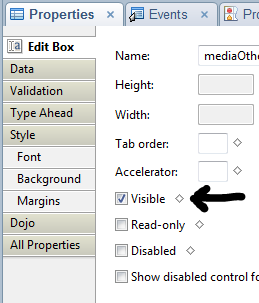
VisibleFormulaMy first attempts, as I am sure everyone’s were, was to think of the ‘visible’ property on the properties of a control as the same thing as a hide-when formula in standard Notes. It’s not. This become more obvious when you see that in source. In source, when you deselect “Visible”, your control gets a property of rendered=false. So, in XPages, if your formula (or simple checkbox) calculates to false, the item is not even rendered. That is, it’s not part of the page, so if values change it doesn’t matter. The formula is not on the rendered XPage to be recomputed. As an old-school standard Notes developer you would expect it to be hidden, but computed and displayed when values change.

Fortunately, there are ways to code controls so that they do act like our standard Notes hide-when formulas.

Your friend, the display style

By using CSS styles, we can have controls exist on the XPage that do not display. By manipulating the style, we can control whether a control appears or not.

<![CDATA[#{javascript:
var eligible = appDoc.getDocument().getItemValueString("Eligible");
if (eligible=="Yes"){
	return "display:block;";
} else {
	return "display:none;";
}
}]]>

Now, just as in standard Notes, in which you needed to make the field which Refreshcontrolled the hide-when forced refreshes when it changed, you also need to do the same thing in XPages. However, the good thing about XPages is that you can do it via a partial refresh, refreshing only the control you want. Fewer round-trips to the server for less data makes for a far more responsive application.

The best thing is that you can add an onchange event handler to any field with a simple line of code, identifying which control you want to refresh. Note that I’m refreshing a panel with my partial refresh — I put the label and the field into the panel so that both are managed by my display style ‘hide-when’.

<xp:eventHandler event="onchange"
submit="true" refreshMode="partial" refreshId="stapleOtherPanel">
</xp:eventHandler>

Even more interesting is when the hide-when is based on a check box group in which one value (“Other” in many cases) determines whether an additional field is displayed. In standard Notes, this would be handled by a simple @Contains, but it’s a little more complex in XPages. Multi-value fields that contain multiples are Vectors, but multi-value fields that contain a single value are simply string variables.

<![CDATA[#{javascript: var control = getComponent("media");
var val = control.getValue();
if (typeof val === "java.util.Vector") {
	// multiple values
 	for (i=0; i<val.size(); i++) {
		if (val.elementAt(i)=="Other") {
			return "display:block;"
 		}
	}
} else {
	// single value
	if (val=="[Other]") {
		return "display:block;"
 	}
}
return "display:none;";
}]]>

It helps when working through these things to check the actual values returned, since, as you see above, sometimes the string returned is not what you think it would be. I’d assumed it would return “Other” in both cases, but when a part of the Vector, it returned a string, and when a string returned the string encased in brackets “[Other]”.

Astute observers will wonder why I’m using getComponent in one and getItemValueString in the other up above. I have to turn to the experts and scratch my head here. I know that each works in the instance I’m using it in and I think that getComponent would work in either, but I’m not sure.

I do wish that IBM would rename the “visible” property to “rendered”, so it is less confusing to the newly minted XPage developer, but it would be problematic to both change that and add a new property named “visible” for using block vs none display style, since it would also confuse everyone.

Categories: Xpages | Tags: , , , | Leave a comment

Filtering source views for use in #xpages

In our continuing example of purchase orders, we move from our examination of dynamic field binding in repeats to the filter used on the source view to select the competition questions we want to appear in that repeat control.

Depending on the type of competition, the source selection method and the dollar amount of the purchase order, there are different questions that the person preparing the purchase order needs to answer about the competition. There are several categories of competition questions, but the layout for the questions and answers remains the same, so I created a custom control that is used by all categories and the custom control appears on the XPage multiple times.

Each time, I pass the category as one of the properties of the custom control, as well as the criteria (type, method and amount). My view is set up with four sorted columns to filter my competition questions, so with the help of Per Henrik Lausten on StackOverflow, I learned that all I have to do is create an array to be used as the key, just as I would in LotusScript for a GetAllDocumentsByKey.

On our Purchase Order XPage, the syntax for one of the custom control insertions would appear as follows:

<xc:pro_competitionQuestions_cc
		sectionTitle="Competitive Process" competitionType="#{javascript:competitionType}"
		sourceSelectionMethod="#{javascript:sourceSelectionMethod}"
		dollarRange="#{javascript:dollarRange}">
</xc:pro_competitionQuestions_cc>

When referring to the custom properties of a custom control within that control, you use compositeData followed by the property name. It makes it rather easy to pass parameters to the control.

In Java, arrays are handled by using a Vector. Simply create the Vector, then addElement to add each of my four filters (category, type, method and amount). When this is assigned to the Keys element of a dominoView used as a source, it filters the documents returned to provide only those that match our filter criteria. Here’s our filter in action:

<xp:this.data>
    <xp:dominoView var="competitionQuestionView"
     viewName="CompetitionQuestions" keysExactMatch="true"
     sortOrder="ascending"
     sortColumn="QuestionSortOrder">
       <xp:this.keys><![CDATA[#{javascript:var vArray = new java.util.Vector();
        vArray.add(compositeData.sectionTitle);
        vArray.add(compositeData.competitionType);
        vArray.add(compositeData.sourceSelectionMethod);
        vArray.add(compositeData.dollarRange);

        return vArray;
        }]]></xp:this.keys>
    </xp:dominoView>
</xp:this.data>

*Updated to us vArray.add instead of vArray.addElement on Jesse Gallagher’s advice. Thanks, Jesse!

Categories: Server-Side Javascript, Xpages | Tags: , , , , | 3 Comments

Repeats and dynamic field bindings #xpages

In our purchase order module, we need to ask certain questions depending on the source selection method, competition type and total cost of the PO. These questions are likely to change over time and in between different instances of the database. So I have a view containing the questions, so that I can add questions dynamically to my XPage without needing to change the code.

To be honest, doing this in a regular Notes form would have required either putting every question on the form or putting a bunch of fields on the form for all the answer fields. Either method would be sloppy and wasteful. There could have been dozens of unnecessary answer fields hidden by hide-whens and constant revisions between various instances of the database leading to a configuration management/version control nightmare.

Doing it in a repeat control, with the source view filtered by values passed in an array, I can get dynamically selected questions with only the necessary fields being stored on the document.

In order to do this, I had to use all of my minimal XPages knowledge, ask several questions on Stack Overflow, re-read portions of Mastering Xpages and scour the help documentation. You, however, can simply follow my guidance and have this solution for your own.

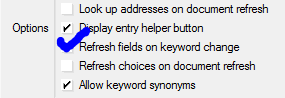
The Question FormCompetition Question Form

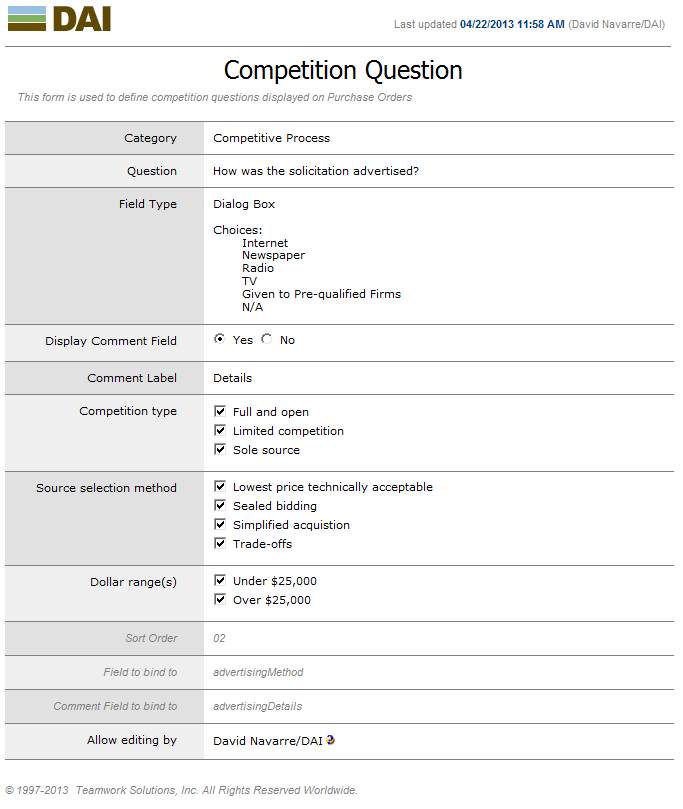
I created a relatively simple Notes form, based on the ones supplied to us for keywords by Teamwork Solutions. The layout is clean and very readable, plus re-using it allows more consistency within our application. A number of the fields are used to determine when and where the question will display (Category, Competition type, Source selection method and Dollar ranges). The checkbox values are derived from keyword documents, to allow maximum flexibility. I’m allowing five field types for answers: Yes/No, Dialog Box, Text Box, Date and Date Range. I had tried Rich Text, but was having problems with losing the handle to the document when saving, and since it wasn’t really required in this implementation, dropped that for later review. Sometimes, the question has a related question to extract more details, so I allowed two questions to be placed on one question document to ensure they display together. Down at the bottom, I’ve got the fields to which the answer fields will be bound on the Notes document. One hazard to allowing the field to be named in this configuration document is that there might be duplicate use of a field name, by the risk level strikes me as low.

Setting up the Repeat

The way that I started to understand repeats was actually when I set up jQuery mobile access to some data after viewing Richard Sharpe’s webinar for TLCC on Building Your First Mobile Application Using XPages I was able to take the knowledge I acquired doing that and use it to link from one Requisition to many Purchase Orders as demonstrated on this blog.

The repeat itself is not that interesting, but, one of the technical tricks in the setup is. As I’ve started to learn XPages, I’ve gotten comfortable with variables stored in applicationScope (available to everyone), sessionScope (available throughout the current user’s session) and viewScope (available on the current page), but had no idea when one would ever use requestScope variables. It turns out that they can be very useful to us here, though we’re going to access them using a dataContext rather than labelling them as requestScope variables.

Since I want to take a value from each Question document to determine the field to bind to on the Purchase Order document, the syntax and re-use will be far easier if I can establish a variable for that field name used within each row of the repeat. This way, we can use Expression Language to refer to the field on the Purchase Order document, binding to it dynamically.

<xp:repeat id="repeat2" rows="30" var="rowData" style="width:700px" value="#{competitionQuestionView}">
    <xp:panel>
        <xp:this.dataContexts>
            <xp:dataContext var="fieldName">
                <xp:this.value><![CDATA[#{javascript:rowData.getColumnValue ("FieldName");}]]></xp:this.value>
            </xp:dataContext>
        </xp:this.dataContexts>
        <--- insert code here --->
    </xp:panel>
</xp:repeat>

First, we want to display our question, with the layout handled by a table. We just grab the column value and display it.

<xp:table>
    <xp:tr>
       <xp:td style="width:200.0px;">
          <xp:label id="label1">
             <xp:this.value><![CDATA[#{javascript:rowData.getColumnValue("Question");}]]></xp:this.value>
          </xp:label>
       </xp:td>

Then, in the right-hand cell, we have the various possible answer fields. Note that since only one is rendered (the rendering formulas being mutually exclusive), it doesn’t matter that we bind to the field multiple times, since only one binding actually appears on the page. Tim Tripcony guided me to this solution in his answer on Stack Overflow. By using array syntax, we bind to the field on the poDoc using the value of our requestScope variable, fieldName. Remember, as a requestScope variable, it is only “alive” for the duration of this data retrieval to create the field binding. The binding formula ends up being very simple: #{poDoc[fieldName]}

Here’s a portion of the answer fields to give you the flavor…

<xp:td>
   <xp:inputText id="inputText1" style="padding-top:2px;width:400px">
      <xp:this.rendered><![CDATA[#{javascript:rowData.getColumnValue("FieldType") == "Text Box"; }]]></xp:this.rendered>
      <xp:this.value><![CDATA[#{poDoc[fieldName]}]]></xp:this.value>
   </xp:inputText>
   <xp:comboBox id="comboBox1" style="padding-top:2px;">
      <xp:this.rendered><![CDATA[#{javascript:rowData.getColumnValue("FieldType") == "Dialog Box"; }]]></xp:this.rendered>
      <xp:selectItems>
         <xp:this.value><![CDATA[#{javascript:rowData.getColumnValue("DialogChoices")}]]></xp:this.value>
      </xp:selectItems>
      <xp:this.value><![CDATA[#{poDoc[fieldName]}]]></xp:this.value>
   </xp:comboBox>
   <xp:inputText id="inputText2" style="padding-top:2px;text-align:left">
      <xp:this.rendered><![CDATA[#{javascript:rowData.getColumnValue("FieldType") == "Date"; }]]></xp:this.rendered>
      <xp:dateTimeHelper id="dateTimeHelper1"></xp:dateTimeHelper>
      <xp:this.converter>
         <xp:convertDateTime type="date"></xp:convertDateTime>
      </xp:this.converter>
      <xp:this.value><![CDATA[#{poDoc[fieldName]}]]></xp:this.value>
   </xp:inputText>
   <xp:radioGroup id="radioGroup1" style="padding-top:2px;width:86.0px">
      <xp:this.rendered><![CDATA[#{javascript:rowData.getColumnValue("FieldType") == "Yes/No"; }]]></xp:this.rendered>
      <xp:selectItem itemLabel="Yes" itemValue="Yes"></xp:selectItem>
      <xp:selectItem itemLabel="No" itemValue="No"></xp:selectItem>
      <xp:this.value><![CDATA[#{poDoc[fieldName]}]]></xp:this.value>
   </xp:radioGroup>
</xp:td>

Since my Question document also allows for the addition of a comment question after the non-TextBox answers, I have another line on the XPage to display those (Note that the dataContext for the commentFieldName requestScope variable has to be added to that panel inside the repeat control as well).

<xp:tr id="commentRow">
   <xp:this.rendered><![CDATA[#{javascript:rowData.getColumnValue("DisplayComment") == "Yes"; }]]></xp:this.rendered>
   <xp:td style="border-bottom:grey solid 0px;padding-top:2px;">
      <xp:label id="label3">
         <xp:this.value><![CDATA[#{javascript:rowData.getColumnValue("CommentLabel");}]]></xp:this.value>
      </xp:label>
   </xp:td>
   <xp:td id="commentCell" style="border-bottom:grey solid 0px;padding-top:2px;">
      <xp:inputText id="inputText3">
         <xp:this.value><![CDATA[#{poDoc[commentFieldName]}]]></xp:this.value>
      </xp:inputText>
   </xp:td>
</xp:tr>

In my next blog post, we’ll look at how we filtered the view data source in order to only display the questions we want on a particular purchase order.

If you don’t already look at XPages questions on Stack Overflow, you really ought to, and if you haven’t been keeping up with TLCC’s webinars, check out the series.
Categories: Server-Side Javascript, Xpages | Tags: , , , , , , , | 1 Comment

Closing Unrelated Projects

When I first started trying to figure out XPages, I had all the default settings and I didn’t fiddle with them. I didn’t know what any of them were for and I still spend most of my time figuring out how to design things rather than how to handle my development environment, but, I am learning.

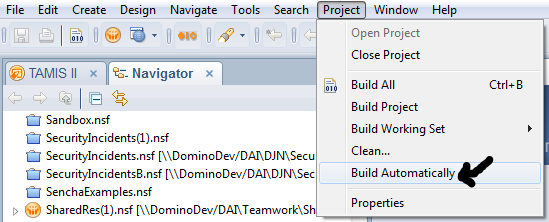
The first change I made was recommended by the folks over at Teamwork SolutioBuildAutomaticallyns, who’ve done some marvelous work on getting our main project rolling. They let me know that leaving the default setting of Build Automatically in the Project menu was a recipe for disaster in a multi-developer environment. I think it’s a bad thing even in a single-developer environment, because it constantly rebuilds your database, slowing down the design process as you wait for your CPU to catch up. If multiple developers are working in a single database, it’s likely to do a build in the middle of someone else’s work, screwing everything up. Of course, in any environment outside of Notes, builds and change control are a far more organized and normal process than we’ve dealt with. By making your builds only occur by conscious decision, you also move in the direction of all those other development environments. (Especially useful in preparing oneself for the inevitable technology and career changes that are normal for developers.)

CleanChoicesSo, on recommendation, I started always doing a Clean and then building just my specific database. Unfortunately, over the course of a day, like any normal Notes developer, I worked on several databases. Sometimes, these were completely unrelated. Why is this unfortunate? Well, my Clean & Build list got sloppy and crowded. Sometimes, in order to make my list look cleaner, I’d close my Designer client and restart it. I knew there was a way to clean up the list without doing that, but it was easy.

Now, I would think that having all those projects open would eat up memory and that removing them would somehow free up memory. Heck, I even thought that closing the Designer client would free up memory. It doesn’t appear to do so, but that might just be the random and anecdotal nature of my “testing”.

Nonetheless, I wanted a cleaner list, so I fiddled around and, I found what I was looking for. CloseUnrelatedProjectsIf you use the Navigator view in your Designer’s Eclipse perspective, you can right-click on the one database you actually want to appear in your Clean & Build dialog, then down toward the bottom choose Close Unrelated Projects. Then, your list looks nice and neat. I wish I could say this speeds processing or limits memory use, but the only performance increase I’ve seen is the change to the dialog box. Hopefully, Notes 9 will provide better memory management in this regard, but even if it does not, my need for a neater workspace will compel me to use this process.

I’d appreciate your thoughts and comments on this, especially if you’ve any speculation or data on performance improvement using this.

Oops! I forgot to mention the biggest reason for closing projects – Search. If you use <ctrl-H> to search your design elements for a string (which I do pretty often) then it will search all open projects. If you have several open projects you’re not working on, you get a lot of extraneous results and it takes far longer to complete. Closing those unrelated projects eliminates the wasted time.

Categories: IDE | Tags: , , , | 2 Comments

Creating one-to-many linking in Xpages

As I noted in my prior post, our new XPages application will need links from Requisitions to all Purchase Orders that are created from that Requisition. Now, in regular old Notes, I’d handle this just by plopping down a single-category embedded view, using the Requisition’s ID to find just the right Purchase Orders. Since embedded views already allow you to open the document underneath, my work would be done.

Fortunately, having found that Server Side Javascript is not frightfully different from LotusScript. You already have the basic understanding of the document object model from doing LotusScript, so it’s just a matter of figuring out the syntax, right?

Since I want to display a set of links to the associated Purchase Orders, I decided the cleanest way to do that was using a Repeat Control. Unfortunately, knowing the tool I needed didn’t resolve the problem by itself.

First, I had to build the values that would go into my Repeat Control. I thought about binding the view here, but our data doesn’t reside in the same database as the XPage designs. That means I’d have to compute which database I needed and, so far, that felt beyond my talents. Fortunately, the wonderful folks over at Teamwork Solutions provided us with a quick way to get a handle to the database, a getDb function. So, rather than trying to figure out how to squeeze that into a binding, I stuck to my LotusScript roots and got a NotesDocumentCollection from the view.

	<xp:this.value><![CDATA[#{javascript:
 		var db:NotesDatabase = getDb("tamisDb");
 		var poView = db.getView("PObyProcReqDocID");
 		var docCollection = poView.getAllDocumentsByKey(getComponent("docID1").getValue());
 		return docCollection;}]]>
 	</xp:this.value>

So, then, in my repeat, I can just refer to each document, pulling the values I want.

I always try to give my objects names that identify them clearly. My very first paid programming assignment was when I was pursuing my degree in Political Science, studying the Soviet Union. I worked at the National Superconducting Cyclotron Lab. It was a great place to work. Now, they don’t normally hire social studies majors to write code, but I hired in as a receptionist, then started working for the guys in Operations, walking around recording numbers on dials and checking on things. My boss knew I’d been a computer science major, so he guided me into re-writing their help document database. Every module in the database was named after a woman in his life. They were suitable names for him, because he knew the woman and the module names fit their personalities. I didn’t and I knew the next guy wouldn’t either, so I gave them all nice, functional names.

Why do I digress? Well, XPages is so eager to write code for you, that it assigns object names with object type and a number. I think a lot of people leave it that way, but when I’m in there, I need to assign names that fit. Sadly, I always end up with rowData as the object name for my repeats. I don’t know if changing from that had doomed my early repeats or if it’s just superstitious, but I leave it as rowData.

So, back to the completed code. Our ‘value’ section is there, identifying the NotesDocumentCollection we need, of all Purchase Orders documents that belong to the Requisition. For each one, we establish a link, labelling it by grabbing a field value, then using a Simple Action to open the pro_purchaseOrder XPage that displays Purchase Orders and using the UNID from the document selected as our rowData.

	<xp:repeat id="purchaseOrderLinkRepeat" rows="30" var="rowData" repeatControls="false" removeRepeat="true">
		<xp:this.value><![CDATA[#{javascript:
			var db:NotesDatabase = getDb("tamisDb");
			var poView = db.getView("PObyProcReqDocID")
			var docCollection = poView.getAllDocumentsByKey(getComponent("docID1").getValue());
			return docCollection;}]]>
		</xp:this.value>
		<xp:link id="poLink">
			<xp:this.text><![CDATA[#{javascript:"Purchase record: " + rowData.getItemValueString("TSWFNumber");}]]>
			</xp:this.text>
			<xp:eventHandler event="onclick" submit="true" refreshMode="complete">
				<xp:this.action>
					<xp:openPage name="/pro_purchaseOrder.xsp" target="openDocument"
						documentId="#{javascript:rowData.getUniversalID();}">
					</xp:openPage>
				</xp:this.action>
			</xp:eventHandler>
		</xp:link>
	</xp:repeat>

Honestly, that little slice of code took me several days to get my head around. I wasn’t staring at the screen the whole time, but the stops-and-starts of trying one approach and then another were tremendous. Those hurdles truly point out that a seasoned developer might well accomplish in an hour what it takes a new developer (or one new to the language) an entire week to do. Now that I have it under my belt, my team and I will be reusing this all over the place. I hope you can as well.

Categories: Server-Side Javascript | Tags: , , , , | 1 Comment

Creating a one-to-one linking in XPages

In our current project, we create Requisitions with one XPage and then create Purchase Orders with another. Each Requisition may result in many Purchase Orders, but a Purchase Order can only contain line items from a single Requisition. Naturally, the customer wants to be able to move seamlessly from the Requisition to any of the corresponding Purchase Orders and vice-versa.

I wasn’t sure how I’d do this in XPages, but knew I could do it for Notes users without a lot of coding and I could even make it look like web link.

One-to-One In Notes

In regular old Notes, this was very simple. On the Purchase Order form, where I wanted my link I typed Open Procurement Request, then highlighted it and clicked from the top-line menu, Create – Hotspot – Action Hotspot. I made two formatting changes (underline and deselecting the border around the hotspot) 1 and switched the action to run LotusScript. Nice, simple code makes that hotspot open the Requisition:

Sub Click(Source As Button)
	Dim session As New NotesSession
	Dim ws As New NotesUIWorkspace
	Dim thisdb As NotesDatabase
	Dim view As NotesView
	Dim uidoc As NotesUIDocument
	Dim thisdoc As NotesDocument
	Dim reqdoc As NotesDocument
	Dim luvalue As Variant

	Set uidoc = ws.CurrentDocument
	Set thisdoc = uidoc.Document
	luvalue = thisdoc.GetItemValue ( "ProcReqDocID" )

	Set thisdb = session.CurrentDatabase
	Set view = thisdb.GetView ( "LUProcByDocID" )
	Set reqdoc = view.GetDocumentByKey ( luvalue(0) )

	Print luvalue (0)
	If Not reqdoc Is Nothing Then
		Call ws.editDocument ( False, reqdoc )
	End If

End Sub

One-to-One In XPages

Having done it in Notes, I had some guidelines for how I wanted to do it in XPages, rather than just shooting in the dark. I also added display of the requisition number, which turned out to take a few lines of code as well.

	<xp:link escape="true" id="requisitionLink" target="_blank">
		<xp:this.rendered><![CDATA[#{javascript:poDoc.getItemValueString("ProcReqDocID") != "";}]]>
		</xp:this.rendered>
		<xp:this.text><![CDATA[#{javascript:
			var reqID = poDoc.getItemValueString("ProcReqDocID");
			var db:NotesDatabase = getDb("tamisDb");
			var reqView:NotesView = db.getView("LUProcByDocID");
			var reqDoc:NotesDocument = reqView.getDocumentByKey(reqID);
			var reqNumber = reqDoc.getItemValueString("TSWFNumber");
			return "Requisition: " + reqNumber; }]]>
		</xp:this.text>
		<xp:eventHandler event="onclick" submit="true" refreshMode="complete">
			<xp:this.action>
				<xp:openPage name="/pro_procurementRequest.xsp" target="openDocument">
					<xp:this.documentId><![CDATA[#{javascript:
						var reqID = poDoc.getItemValueString("ProcReqDocID");;
						var db:NotesDatabase = getDb("tamisDb");
						var reqView:NotesView = db.getView("LUProcByDocID");
						var reqDoc:NotesDocument = reqView.getDocumentByKey(reqID);
						return reqDoc.getUniversalID();}]]>
					</xp:this.documentId>
				</xp:openPage>
			</xp:this.action>
		</xp:eventHandler>
	</xp:link>

While this was somewhat intimidating, it ended up being not that hard. I will admit that it did take me a whole day to figure out, but it gave me the courage to try tackling linking in the opposite direction, our one-to-many link. For that, I had to expand my recently gained knowledge of repeats. More on that later.

My recent knowledge gain for repeats is thanks to TeamStudio’s webinar on mobile applications. Go figure. As I implement the mobile application that the webinar guided me through building, I’ll blog about that as well. For now, go check out the video.

1) Does anyone use those borders around the hotspot anymore? Since it looks so hideously and is therefor unusable shouldn’t it no longer be the default? Shouldn’t it instead default to underlined?

Categories: Server-Side Javascript | Tags: , , | 1 Comment

Set Prohibit Design Refresh

One thing about taking the Notes development exams was that it forced me to explore the obscure parts of Notes development.

I took my first Notes application development exam so long ago, the date isn’t even on my resume (R4 in about 1997 or so), then took each update exam through R7 to maintain my certification as a “Professional” or an “Advanced Application Developer”. I also wrote the questions for Brainbench’s R5 Notes application development exam (and some of the R6 exam, which I’m not sure if they ever released). So, I was forced to learn all the new wrinkles in each new release.

For fun, I used my free exam at the recent Lotusphere Connect conference to sample the LotusScript exam. I decided on the last day to take it, then failed by just one question with no preparation. It was a tough exam, delving into parts of LotusScript I’ve never used, but which provide new capabilities.

I’ve always found that Notes has more capability than I thought it did. As a junior developer, I would sometimes think that something simply couldn’t be done in Notes, then, after working on it for a while, exploring and stretching my knowledge, finding that not only could it be done, but that I was able to do it myself. So, while there are, in fact, things that Notes cannot do and things that Notes is not the best tool to do, I never say “It can’t be done” any more.

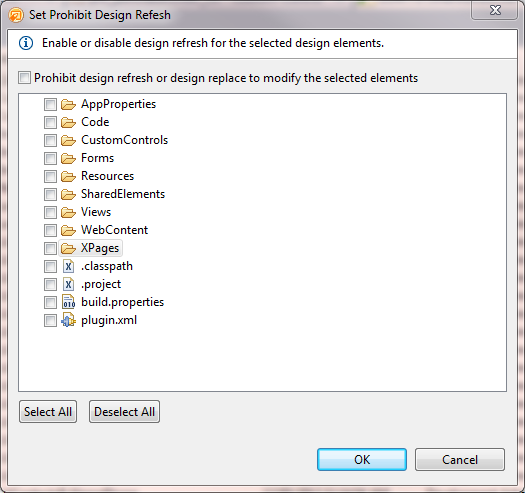
Set Prohibit Design RefreshBecause of the exposure forced by those exams, I often knew of capabilities, even if I had not exploited them. Hopefully, blogging XPages is going to force me to explore the obscure as well.

Today, I was clicking around, refreshing a design with some changes I’d made and I noticed something I had not seen before. On the menus, under File – Application, I saw down near the bottom “Set Prohibit Design Refresh…” I don’t know when that started appearing, but it practically jumped off the screen at me.

I’d been impressed when I realized I could change that property on multiple design elements of the same type in the work pane, but it’s terrific to be able to do it across the entire database so quickly and easily.

I think it would be a nice upgrade to that capability to allow the application of a specific template at that level, selecting a collection of design elements quickly there. In our of our main designs, there are a variety of modules used in each similar database and one database can have elements from three or four templates. If I take several design elements and move them into a “module template”, it would be nice to use this kind of dialog to retro-fit the databases to pull from the new module template going forward. Of course, I’m sure someone could design a utility to do that, but I think it would be nice to see in the basic designer client. What do all y’all think?

Categories: IDE | Tags: | 1 Comment

Create a free website or blog at WordPress.com.