Since I’m still new to XPages, I’m always finding things that are a challenge. Most of the time, I don’t know how big a challenge they are because doing things in XPages isn’t the same as doing them in Old Notes.
Business case
On the payment request in our procurement module, the user needs to enter the exchange rate between the local currency and the base currency for approval routing. Sometimes, the payment has already been made in local currency while the exchange rate has changed. They might only know the amounts in the two currencies, but didn’t record the exchange rate at the time.

Solution
In discussions, I suggested that it might not be difficult to simply have a popup that allowed the user to enter the amounts and return the value to the payment request in the UI.
Surprisingly to me, I was right. It’s not that hard. My challenge was that I decide to put this exchange rate computer into a custom control so that I’d be able to re-use it. That meant having to figure out how to have the dialog do a partial refresh on the payment request, in order to recompute the total amount in the base currency (USD).
Existing design considerations
Our procurement module was originally designed by the brilliant minds over at Teamwork Solutions, led by Scott Good. It’s very nice, but this wasn’t included in the original requirements gathering. (What percentage of actual requirements do get into the original requirements gathering?)
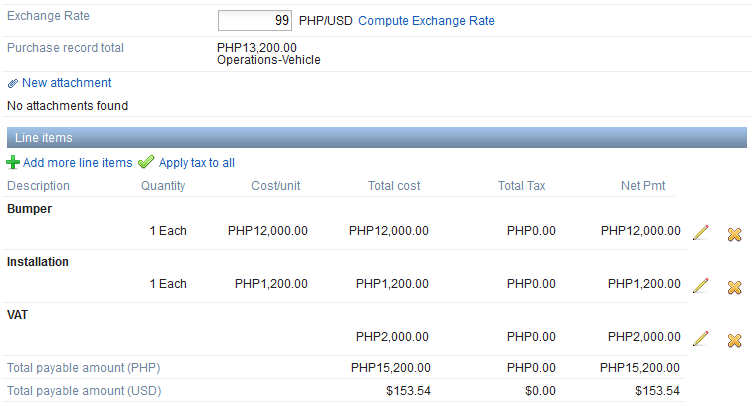
Each of those line items displayed in the payment request is a separate Notes document, so, in Old Notes terms, this would be like an embedded view, but since we’re in XPages, it’s a repeat. (I am learning to love repeats!) The total payable amounts are ‘computed fields’ in XPages, which is like a computed for display field in Old Notes. As such, they wouldn’t actually save anything to the payment request document. So, we have some non-displayed computed fields with some server-side Javsacript (SSJS) that aggregates all the local amounts from those view entries and puts it into the control on the XPage. As such, when the exchange rate changes, there is a partial refresh.
So, on our exchange rate control, we had a partial refresh for onchange. Simple control, bound to a field on our payment request document.
<xp:inputText id="exchangeRate" value="#{payDoc.Exchange_Rate}" style="text-align:right;width:70.0px;">
	<xp:this.converter>
		<xp:convertNumber type="number"></xp:convertNumber>
	</xp:this.converter>
	<xp:eventHandler event="onchange" submit="true" refreshMode="partial" refreshId="paymentCostInfoPanel">
	</xp:eventHandler>
</xp:inputText>
Design
So, I created my exchangeRateComputer custom control. I decided to make the link part of the custom control so that implementing it on any other XPage would require the least work possible. I decided to always set the control on the XPage to be named “exchangeRate”, so I don’t have to pass a string with the control name. As an added bonus, I wanted to fill out the local currency field for the user and just let them enter the final base currency amount they’d like to see.
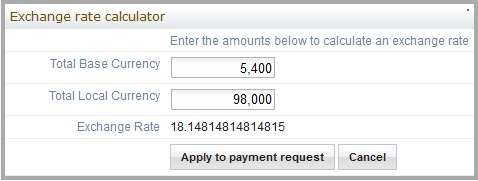
I ran into one problem. I couldn’t get it to do the partial refresh from the exchangeRateComputer custom control. I’d tried some XSP.partialRefreshGet commands but was having problems and realized…. I might want the name of the element to be refreshed to be different on different XPages. Since passing the compositeData value into the XSP.getElementById seemed beyond my capabilities, I decided to simply defer all refreshes to the exchangeRate control itself. So, I ended up adding an onblur partial refresh. When the user clicks on the ‘Apply to payment request button’, it puts focus onto the exchangeRate control, then, closes the dialog. Closing the dialog blurs focus from the exchangeRate control and…. with an added onblur event, performs a partial refresh for me. (The onblur event is identical to the onchange, except for the name.)
<?xml version="1.0" encoding="UTF-8"?>
<xp:view xmlns:xp="http://www.ibm.com/xsp/core" xmlns:xe="http://www.ibm.com/xsp/coreex">
	<xp:link escape="true" text="Compute Exchange Rate" id="computeLink"
		style="margin-left:5px;">
		<xp:eventHandler event="onclick" submit="false">
			<xp:this.script><![CDATA[XSP.openDialog('#{id:computeDialog}');]]></xp:this.script>
		</xp:eventHandler>
	</xp:link>

	<xe:dialog id="computeDialog" title="Exchange rate calculator">
		<xp:table>
			<xp:tr>
				<xp:td>
				</xp:td>
				<xp:td>
					<xp:label id="instructions" value="Enter the amounts below to calculate an exchange rate">
					</xp:label>
				</xp:td>
			</xp:tr>
			<xp:tr>
				<xp:td style="width:150px;text-align:right;">
					<xp:label id="total_baseCurrencyLabel" value="Total Base Currency">
					</xp:label>
				</xp:td>
				<xp:td>
					<xp:inputText id="total_baseCurrency" style="width:100px;text-align:right;">
						<xp:this.converter>
							<xp:convertNumber type="number"></xp:convertNumber>
						</xp:this.converter>
						<xp:eventHandler event="onchange" submit="true"
							refreshMode="complete">
							<xp:this.action><![CDATA[#{javascript:var base = getComponent("total_baseCurrency").getValue();
var local = getComponent("total_localCurrency").getValue();
rate = local / base;
getComponent("rate").setValue(rate);}]]></xp:this.action>
						</xp:eventHandler>
					</xp:inputText>
				</xp:td>
			</xp:tr>
			<xp:tr>
				<xp:td style="text-align:right;">
					<xp:label id="total_localCurrencyLabel" value="Total Local Currency">
					</xp:label>
				</xp:td>
				<xp:td>
					<xp:inputText id="total_localCurrency"
						defaultValue="#{javascript:compositeData.localCurrency}"
						style="width:100px;text-align:right;">
						<xp:this.converter>
							<xp:convertNumber type="number"></xp:convertNumber>
						</xp:this.converter>
						<xp:this.validators>
							<xp:validateLongRange minimum="1"></xp:validateLongRange>
						</xp:this.validators>
						<xp:eventHandler event="onchange" submit="true"
							refreshMode="complete">
							<xp:this.action><![CDATA[#{javascript:var base = getComponent("total_baseCurrency").getValue();
var local = getComponent("total_localCurrency").getValue();
rate = local / base;
getComponent("rate").setValue(rate);}]]></xp:this.action>
						</xp:eventHandler>
					</xp:inputText>
				</xp:td>
			</xp:tr>
			<xp:tr>
				<xp:td style="text-align:right;">
					<xp:label id="rateLabel" value="Exchange Rate"></xp:label>
				</xp:td>
				<xp:td>
					<xp:text escape="true" id="rate"></xp:text>
				</xp:td>
			</xp:tr>
			<xp:tr>
				<xp:td>
				</xp:td>
				<xp:td>
					<xp:button value="Apply to payment request"
						id="copyButton">
						<xp:eventHandler event="onclick" submit="true"
							refreshMode="complete">
							<xp:this.script><![CDATA[var rate = XSP.getElementById("#{id:rate}");
XSP.getElementById("#{id:exchangeRate}").value = rate.innerHTML;
XSP.getElementById("#{id:exchangeRate}").focus();
XSP.closeDialog('#{id:computeDialog}');]]></xp:this.script>
						</xp:eventHandler>
					</xp:button>
					<xp:button value="Cancel" id="cancelButton">
						<xp:eventHandler event="onclick"
							submit="false">
							<xp:this.script><![CDATA[XSP.closeDialog('#{id:computeDialog}');]]></xp:this.script>
						</xp:eventHandler>
					</xp:button>
				</xp:td>
			</xp:tr>
		</xp:table>
	</xe:dialog>
</xp:view>
The last tweak to it is that my computed exchange rate in the dialog is just a computed field. I struggled a little until a dogpile search revealed that I needed to get that value as innerHTML. If you try getValue() on a computed field, you get bupkis, but if you grab the innerHTML, you’ve got the world in your hands.
It feels like that would be easier in Old Notes, but I hardly care any more. I have a new micro-solution in my toolbox and I expect to re-use this not only for other exchange rate computations, but to re-use the dialog and value-passing in many places. It’s all about building up your toolkit, right?
 Lost in Code