One of the bigger hurdles in design and usability for me when making the transition from standard Notes to XPages is, how do you make hide-whens that work like they do in standard Notes?
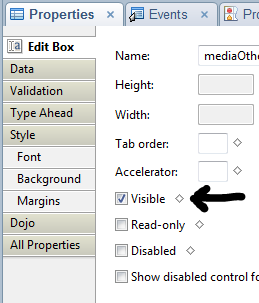
 My first attempts, as I am sure everyone’s were, was to think of the ‘visible’ property on the properties of a control as the same thing as a hide-when formula in standard Notes. It’s not. This become more obvious when you see that in source. In source, when you deselect “Visible”, your control gets a property of rendered=false. So, in XPages, if your formula (or simple checkbox) calculates to false, the item is not even rendered. That is, it’s not part of the page, so if values change it doesn’t matter. The formula is not on the rendered XPage to be recomputed. As an old-school standard Notes developer you would expect it to be hidden, but computed and displayed when values change.
Fortunately, there are ways to code controls so that they do act like our standard Notes hide-when formulas.
Your friend, the display style
By using CSS styles, we can have controls exist on the XPage that do not display. By manipulating the style, we can control whether a control appears or not.
<![CDATA[#{javascript:
var eligible = appDoc.getDocument().getItemValueString("Eligible");
if (eligible=="Yes"){
	return "display:block;";
} else {
	return "display:none;";
}
}]]>
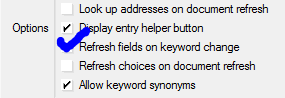
Now, just as in standard Notes, in which you needed to make the field which  controlled the hide-when forced refreshes when it changed, you also need to do the same thing in XPages. However, the good thing about XPages is that you can do it via a partial refresh, refreshing only the control you want. Fewer round-trips to the server for less data makes for a far more responsive application.
The best thing is that you can add an onchange event handler to any field with a simple line of code, identifying which control you want to refresh. Note that I’m refreshing a panel with my partial refresh — I put the label and the field into the panel so that both are managed by my display style ‘hide-when’.
<xp:eventHandler event="onchange"
submit="true" refreshMode="partial" refreshId="stapleOtherPanel">
</xp:eventHandler>
Even more interesting is when the hide-when is based on a check box group in which one value (“Other” in many cases) determines whether an additional field is displayed. In standard Notes, this would be handled by a simple @Contains, but it’s a little more complex in XPages. Multi-value fields that contain multiples are Vectors, but multi-value fields that contain a single value are simply string variables.
<![CDATA[#{javascript: var control = getComponent("media");
var val = control.getValue();
if (typeof val === "java.util.Vector") {
	// multiple values
 	for (i=0; i<val.size(); i++) {
		if (val.elementAt(i)=="Other") {
			return "display:block;"
 		}
	}
} else {
	// single value
	if (val=="[Other]") {
		return "display:block;"
 	}
}
return "display:none;";
}]]>
It helps when working through these things to check the actual values returned, since, as you see above, sometimes the string returned is not what you think it would be. I’d assumed it would return “Other” in both cases, but when a part of the Vector, it returned a string, and when a string returned the string encased in brackets “[Other]”.
Astute observers will wonder why I’m using getComponent in one and getItemValueString in the other up above. I have to turn to the experts and scratch my head here. I know that each works in the instance I’m using it in and I think that getComponent would work in either, but I’m not sure.
I do wish that IBM would rename the “visible” property to “rendered”, so it is less confusing to the newly minted XPage developer, but it would be problematic to both change that and add a new property named “visible” for using block vs none display style, since it would also confuse everyone.
 Lost in Code